Saturday, April 26, 2014

Time Management - Part I - Cozi

Scheduling & the way I run my calendar 

*note* this post is not being compensated in any way - I just use this tool & LOVE it! 

Today we will start a NEW series on Time Management!!  I'm so excited to share with you how my crazy/busy/hectic life is actually not driving me completely crazy! 

So ... for those of you out there that are extremely busy (like the rest of us)  - here is the first tool I am going to share with you  - Cozi

Cozi is an online service that syncs a digital schedule with your grocery list, a to-do list, meal planning, a message service, and a journal feature.

The best part is that more than one family member can download the app on their phone (available for both iphone and android) and then you can share (and update) your grocery list!!  You share the same password and each family member can log in with their own e-mail address!

Here is what the shopping list portion looks like from my phone:

If you would like to take advantage of more features, there is a "gold" upgrade that gives the ability to use the birthdays tool, shopping list mode and some other neat features.  This costs $24.99 per year. 

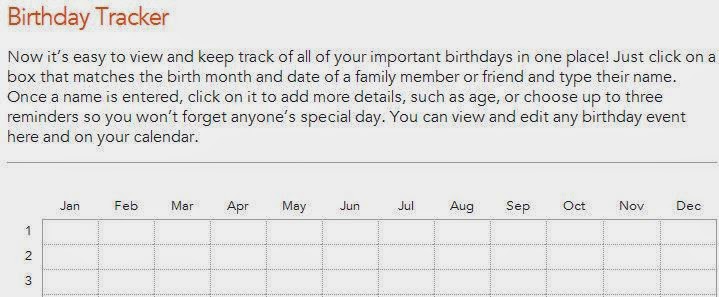
Personally, I use this birthday's tool in order to remember all of those important days for both H & I's families AND to remember customer birthdays for my business...  this feature is the reason I decided to subscribe to the gold service - pictured below:
Give Cozi a shot and let me know what you think - Also ask any questions you'd like about how I use this app/web-service to run my calendar!

Everything in Place Please

Wednesday, April 23, 2014

Brain Book 4/23/14

An early morning Brain Book this time!

Here is what I've been  filling my brain with! - Each of these is so good I could spend hours on them; so I won't post too many!!


       Leave me your ideas for things I should fill my BrainBook with!  I look forward to hearing your suggestions; and helping to move all of us forward into a more organized life! 


Everything In Place Please 


Saturday, April 19, 2014

$5 Savings Plan

As you know,  I am working on a Master's degree in Family Financial Planning - so many of my posts will be related to finances.   I even have a pinterest board called Money Matters.

Today - our topic is the $5 Savings Plan


 I know this is going to sound crazy to a lot of you; but it WORKS!    Saving for something $5 at a time is really easy if you follow this system!

In the spirit of trying to save for my (two) vacations at the end of July,  I need to have a plan in place for my personal spending money on the trip...a good friend gave me the idea for what I am now calling my $5 savings plan.


Here are the rules:
  1. Carry Cash
  2. Every Time you get a $5 bill as change - it goes straight to savings! 
That's it!  Those are the rules!   Simple!  (and effective!)


I have already put away nearly $100 in savings for my trip this Summer,  and I've only had this system in place for 6 weeks! 

What can you save for $5 at a time?   

Everything In Place Please

Wednesday, April 16, 2014

Brain Book - 4/16/14


Here is what I've been looking at and filling my brain with for the past few days!

Today's BrainBook:


  •   Take customization to the next level // InkGarden.com 
    • I really like this site for creating custom postcards, mugs, whatever really - there is no charge for uploading custom photos, which is great & everything is highly customizable!  Yay!


       Leave me your ideas for things I should fill my BrainBook with!  I look forward to hearing your suggestions; and helping to move all of us forward into a more organized life! 


Everything In Place Please 

Saturday, April 12, 2014

Top 10 - Organizing!

Yes, I know; an organizing blog with a top 10 list of organizing essentials, but this list is full of things I absolutely could not be organized without.  In fact, I'd dare to say that this blog would not exist without these top 10 items!

READY, SET, TOP 10!

#1 Password Book 

  • This is my brain saver super hero!  The one that I use I got from Amazon, and I absolutely love it!  This is one thing I could not live without (it even has it's own pocket in my purse).  
  • I have a lot of passwords between my work and home websites; and I try to keep them all different, so the password book is extremely helpful
  • *tip* this particular book has a line for password "hint" - use it instead of writing out your passwords, as a written record of all of your passwords could be disastrous if you ever lost it. 

Click Here to link to Amazon for the password organizer I use! (photo also from Amazon)
#2 sticky notes 
  • I have sticky note fever!  I use both paper versions of these stickies, but also a desktop version for my work and home computers!
The 4 main colors I use 


#3 Binders (the 3 ring variety) 
  • If you are anything like me, you probably have a few of these little gems running around unused in your house.  Don't fret!  These things are a gold mine of ways to organize yourself!
  • Some things I use mine for
    • Recipe Binders 
    • Business Organization 
    • Supply Keepers
    • Home Organization Binder 
    • Finance Binders 
    • Blog Idea Log 
    • and more ... (I promise a not so distant future post that will explain some of my systems for using binders in detail!)
Photo credit: Microsoft Office Image Search


#4 Mesh Cubes

  • These build-able blocks are so flexible!  I personally use them in the bottom portion of my closet to separate clothes and to corral socks that don't fit in our limited drawer space.  These are on my organizing top 10 simply because they are invaluable for those in small space living situations!
  • I think that I originally bought mine in college as an easy dorm living solution, but they are still proving valuable for me every single day (and I've been out of college for 4+ years!)


Build-able mesh cubes - I found mine at Target (picture also Target)
#5 Launching Station 

  • This is an idea that I borrowed from Simplify Your Time by Marcia Ramsland
  • Basically, it is where everything that I need for the next day is set out so it is ready for a quick get away when I'm ready to leave the house.   
My Launching Station

#6 Letter Trays 

  • I have several different sets of letter trays that I use both at work and in my home office. 
Amazon.com (photo also Amazon) 

#7 Magnetic List Notes 

  • 2 things that make these an invaluable organizing tool
    • The Magnet 
      • They attach to any magnetic surface including the fridge and file cabinets - this way there is always a piece of paper handy when you need one (an it eliminates the paper clutter of notepads everywhere without a home) 
    • The Price 
      • I buy them at the dollar store once a year. When I run out I spend $10 and am set for the year! 
      • There is really no need to buy expensive versions of these - they are so easy to find in the reduced bins at large chain stores, craft stores, and discount stores. 
My office file cabinet notes


# 8 Bookshelves 

  • Shelving of any kind is absolutely essential for small space living!  
  • Below you will see some pictures of my home office bookshelves, but rest assured shelving will come up again in later posts.


#9 Bins 

  • Fabric Bins with handles help to organize all sorts of different portions of my house; including the fridge, pantry, bookshelves and office furniture!
Picture from Amazon.com


#10 Mail Center 


  • Our Mail center is where all the mail comes in and gets sorted before ending up in its ultimate destination (usually the file cabinet)
    • Our mail center also has stamps, paper clips, phone books, a calendar, some envelopes, pens, scissors, and a file folder system that works for us ...
      • Make yours work for you and your family - feel free to use mine as an example of a place to start, and add hanging files or folders as deemed appropriate for your family!
  • One of the most important steps to a functional mail center is ensuring that each person empties their portions of the file system on a regular basis.  (If this doesn't happen, the mail center becomes a clutter center - yuck!) 

Everything In Place Please 

Thursday, April 10, 2014

Free Photo Shares - Thursday Tech Tip

For today's Tech Tip, I am going to show you a few of my favorite file share sites.   I use these sites a lot in my work because I make a lot of posters, and I don't want to run into any trouble with copyright issues.

The first file share that I use a lot is from Microsoft.  All of the photos are free-share, meaning that they do not have copyright issues.  Lucky for me, there are hundreds of files on this file share; and lots of instrument pictures.  At work, most of my posters are concert related.   Therefore Instrument backgrounds are common.

http://office.microsoft.com/en-us/images/   -  This is the address for the microsoft images - I recommend bookmarking it so that you can use it whenever you need it.
This is an example of the results you get with a simple search.   I used the word "instrument".


This is a second site that I use, although it is not nearly as exhaustive as the Microsoft file share.... http://www.copyrightfreephotos.com/    The downside to this site is that it does not have the search function available with the other site, but there are good quality images.  

http://www.freedigitalphotos.net/    This website has a very well organized selection of free photos, it also has a search function.   The left-hand navigation menu has a list of categories (and sub-categories) of thousands of popular photos.  

http://www.stockvault.net/   The stockvault website is more on the design-heavy side.   It is a valuable resource for design conscious individuals, although it has less type-specific images. 

http://freerangestock.com/index.php   Free stock photos are also available from this site - and there are some very high quality stock photos on this site, and guess what?  There is a search function! 

Everything In Place Please

Saturday, April 5, 2014

A general outline of this blog

I know that one of the more important things about an organizational blog is organization!   (Ground shattering ... right?)

So in that vein,  I'd like to let you know a rough plan for how I'm planning on proceeding with this blog:
  • Wednesdays  - Brain Book Posts
    • "Hump Day" seems like a good day for this! 
  • Thursdays - Technology Tips 
    • I make a living with technology - so I will be passing on some of my better tips to you
  • Fridays  - Favorite Recipes! 
    • Fridays are my favorite day of the week, so Fridays will be my favorite recipes! 
  • Weekends  - projects, series, top 10's, DIY's, small space living, organizing - etc. 
    • These will be the longer posts - and they often take more time to write and to prep; so they are best on the weekends! 

I think these general ideas will help with consistency and readability! 

If you are wondering about the first two days of the week - here's my reasoning behind leaving those days off!
  • Mondays and Tuesdays - no posts or guests posts
    • Mondays are usually very busy for me; so I am not planning on posting on Mondays
    • Tuesdays are almost always an athletic game for me - this summer it will be soccer night